程序运行时的内存区域
一个 Linux x86-64 , 进程地址可以这么理解
| 空间 | 高地址 |
|---|---|
| stack | |
| mmap area | |
| heap | |
| .bss | |
| .data | |
| .rodata | |
| .text | 低地址 |
.text
保存程序代码,也就是 CPU 执行的机器指令
void hello(){ puts("hello");}编译后这个函数对应的机器码就在.text
.rodata
.rodata - read only data,用来保存只读数据,例如上个函数的 hello就放在 .rodata
.data
保存已经初始化的全局或静态变量
int global_number = 123; global_number就放在 .data
.bss
保存未初始化,或初始化为 0 的全局变量
int global_counter;char global_buffer[128];这些变量在程序启动时会被初始化为 0
heap
heap 用于动态内存分配
malloccallocreallocfreechar *p = malloc(32)这里返回一块堆内存的地址
stack
主要保存:
- 函数局部变量
- 参数
- 返回地址
- 寄存器
- 函数调用现场
heap 与 stack 的区别
栈上的对象跟随函数调用自动创建和销毁
例如:
void func(){ char buf[4];}进入 func(),buf存在,离开后自动销毁。
而堆由程序员手动申请和释放
char *p = malloc(32);free(p);指针
地址和值
int x = 123;我们假设 x 在 0x7fffffffe000。
即:
| 地址 | 值 |
|---|---|
| 0x7fffffffe000 | 123 |
| 我们取地址 |
int *p = &x;此时 p 保存 x 的地址 p = 0x7fffffffe000&,*
int x = 123;int *p = &x;含义如下:
x x 的值&x x 的地址p p 保存的地址*p p 指向地址处的值即:
p = &x*p = x指针类型
char *p1;int *p2;long *p3;区别
char * 解引用读取 1 字节int * 读取四字节long * 读取 8 字节int arr[4] = {1,2,3,4};int *p = arr;那么p+1通常表示地址加 4
我们也可以强制转换指针类型
char *q = (char *)arr;此时 q+1 表示地址加 1
指针变量占据内存
#include <stdio.h>int main() { printf("%zu\n",sizeof(void *)); printf("%zu\n",sizeof(char *)); printf("%zu\n",sizeof(int *));}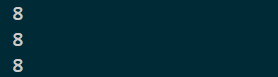
指针与堆内存
char *p = malloc(32);这个代码有两部分
p ---> 指针变量malloc(32) 返回值 ---> 堆块地址如果 p 为局部变量 ,那么就是栈上的 p 指向的内容在堆
空指针
空指针表示目前不指向有效对象。
int *p = NULL;也就是说我们需要检查指针是否为空
if(p != NULL){ printf("%d\n",*p);}如果我们直接解引用空指针,就会崩溃
悬空指针
指的是已经不再指向有效对象,但仍然保存旧地址的指针。
最常见来源
char *p = malloc(32);free(p);虽然我们 free 了 p,但是 p 的值没有自动改变,指向的是已经释放了的堆块。
更安全的写法为
free(p);p = NULL;小端序
低位字节放在低地址,高位字节放在高地址。
例如:
0x12345678排列为78 56 34 12#include <stdio.h>#include <stdint.h>int main() { uint64_t x = 0x1122334455667788; unsigned char *p = (unsigned char *)&x; for (int i = 0; i < 8; i++) { printf("%02x ", p[i]); } puts(""); return 0;}
结构体内存布局
C 语言中的 struct 会按照字段声明顺序放入内存,但编译器可能插入填充字节
基本结构体
struct User { int id; long score;};由于通常要求 8 字节对齐,所以内存空间实际为:
| 变量 | 字节 |
|---|---|
| id | 4bytes |
| padding | 4bytes |
| score | 8bytes |
所以 sizeof 的大小为 16 而非 12
offsetof观察偏移
#include <stdio.h>#include <stddef.h>struct A { char c; long x; int y;};int main() { printf("sizeof(struct A) = %zu\n", sizeof(struct A)); printf("offset c = %zu\n", offsetof(struct A, c)); printf("offset x = %zu\n", offsetof(struct A, x)); printf("offset y = %zu\n", offsetof(struct A, y)); return 0;}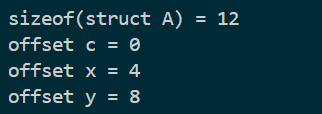
常见对齐规则
| 变量 | 字节对齐 |
|---|---|
| char | 1bytes,对齐 1 |
| short | 2bytes,对齐 2 |
| int | 4bytes,对齐 4 |
| long | 8bytes,对齐 8 |
| 指针 | 8bytes,对齐 8 |
结构体中的数组
struct Item { char name[16]; int price;};布局:
| name[16] |
|---|
| price |
结构体中的指针
struct Item{ char name[16]; char *p;};布局为
name[16]p ptrstruct Item item;item.p = malloc(32);关系为
name[16]p ptr -> heap addr heap: p content结构体数组
struct Item items[3];此时结构体在内存中连续排列
指针数组
struct Item *items[3];数组中保存的是指针
items[0] ptritems[1] ptritems[2] ptr每个指针都可以指向堆上的一个结构体
函数指针
语法
void (*fp)();含义
fp 是一个指针,指向一个函数,这个函数无参,返回值是 void#include <stdio.h>void hello() { puts("hello");}void goodbye() { puts("goodbye");}int main() { void (*fp)(); fp = hello; fp(); fp = goodbye; fp(); return 0;}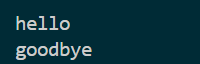
带参数的函数指针
#include <stdio.h>void print_number(int x) { printf("%d\n", x);}int main() { void (*fp)(int); fp = print_number; fp(123); return 0;}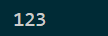
void (*fp)(int)表示fp 指向一个函数,这个函数接收一个 int 参数,返回 void普通指针和函数指针的区别
普通指针用来读写数据,函数指针用来决定执行什么函数
EFL 基础
file

ELF 64-bit LSB executable, x86-64, version 1 (SYSV), dynamically linked, interpreter /lib64/ld-linux-x86-64.so.2, BuildID[sha1]=1ae7b9855afea02882e7fc25082946f082c8ec03, for GNU/Linux 3.2.0, not strippednm
lmx@lmx:~/pwn/ZeroG/format$ nm -n format_station w __gmon_start__ U __libc_start_main@@GLIBC_2.2.5 U printf@@GLIBC_2.2.5 U puts@@GLIBC_2.2.5 U read@@GLIBC_2.2.5 U setbuf@@GLIBC_2.2.5 U __stack_chk_fail@@GLIBC_2.40000000000401000 T _init00000000004010d0 T _start0000000000401100 T _dl_relocate_static_pie0000000000401110 t deregister_tm_clones0000000000401140 t register_tm_clones0000000000401180 t __do_global_dtors_aux00000000004011b0 t frame_dummy00000000004011b6 T ret_gadget00000000004011e9 T pop_rdi_ret0000000000401215 t read_canary0000000000401257 T init_io00000000004012c5 T vuln00000000004013bd T main0000000000401400 T __libc_csu_init0000000000401470 T __libc_csu_fini0000000000401478 T _fini0000000000402000 R _IO_stdin_used0000000000402070 r __GNU_EH_FRAME_HDR0000000000402274 r __FRAME_END__0000000000403db0 d __frame_dummy_init_array_entry0000000000403db0 d __init_array_start0000000000403db8 d __do_global_dtors_aux_fini_array_entry0000000000403db8 d __init_array_end0000000000403dc0 d _DYNAMIC0000000000403fb0 d _GLOBAL_OFFSET_TABLE_0000000000404000 D __data_start0000000000404000 W data_start0000000000404008 D __dso_handle0000000000404010 B __bss_start0000000000404010 D _edata0000000000404010 D __TMC_END__0000000000404020 B stdout@@GLIBC_2.2.50000000000404030 B stdin@@GLIBC_2.2.50000000000404040 B stderr@@GLIBC_2.2.50000000000404048 b completed.80610000000000404050 B _end常见符号类型
T 代码段符号B .bss 段符号D .data 段符号R 只读数据符号U 未定义符号,通常来自动态库readelf
lmx@lmx:~/pwn/ZeroG/format$ readelf -S format_stationThere are 30 section headers, starting at offset 0x3ae0:节头: [号] 名称 类型 地址 偏移量 大小 全体大小 旗标 链接 信息 对齐 [ 0] NULL 0000000000000000 00000000 0000000000000000 0000000000000000 0 0 0 [ 1] .interp PROGBITS 0000000000400318 00000318 000000000000001c 0000000000000000 A 0 0 1 [ 2] .note.gnu.pr[...] NOTE 0000000000400338 00000338 0000000000000020 0000000000000000 A 0 0 8 [ 3] .note.gnu.bu[...] NOTE 0000000000400358 00000358 0000000000000024 0000000000000000 A 0 0 4 [ 4] .note.ABI-tag NOTE 000000000040037c 0000037c 0000000000000020 0000000000000000 A 0 0 4 [ 5] .gnu.hash GNU_HASH 00000000004003a0 000003a0 0000000000000034 0000000000000000 A 6 0 8 [ 6] .dynsym DYNSYM 00000000004003d8 000003d8 0000000000000108 0000000000000018 A 7 1 8 [ 7] .dynstr STRTAB 00000000004004e0 000004e0 000000000000007f 0000000000000000 A 0 0 1 [ 8] .gnu.version VERSYM 0000000000400560 00000560 0000000000000016 0000000000000002 A 6 0 2 [ 9] .gnu.version_r VERNEED 0000000000400578 00000578 0000000000000030 0000000000000000 A 7 1 8 [10] .rela.dyn RELA 00000000004005a8 000005a8 0000000000000078 0000000000000018 A 6 0 8 [11] .rela.plt RELA 0000000000400620 00000620 0000000000000078 0000000000000018 AI 6 23 8 [12] .init PROGBITS 0000000000401000 00001000 000000000000001b 0000000000000000 AX 0 0 4 [13] .plt PROGBITS 0000000000401020 00001020 0000000000000060 0000000000000010 AX 0 0 16 [14] .plt.sec PROGBITS 0000000000401080 00001080 0000000000000050 0000000000000010 AX 0 0 16 [15] .text PROGBITS 00000000004010d0 000010d0 00000000000003a5 0000000000000000 AX 0 0 16 [16] .fini PROGBITS 0000000000401478 00001478 000000000000000d 0000000000000000 AX 0 0 4 [17] .rodata PROGBITS 0000000000402000 00002000 0000000000000070 0000000000000000 A 0 0 4 [18] .eh_frame_hdr PROGBITS 0000000000402070 00002070 000000000000006c 0000000000000000 A 0 0 4 [19] .eh_frame PROGBITS 00000000004020e0 000020e0 0000000000000198 0000000000000000 A 0 0 8 [20] .init_array INIT_ARRAY 0000000000403db0 00002db0 0000000000000008 0000000000000008 WA 0 0 8 [21] .fini_array FINI_ARRAY 0000000000403db8 00002db8 0000000000000008 0000000000000008 WA 0 0 8 [22] .dynamic DYNAMIC 0000000000403dc0 00002dc0 00000000000001f0 0000000000000010 WA 7 0 8 [23] .got PROGBITS 0000000000403fb0 00002fb0 0000000000000050 0000000000000008 WA 0 0 8 [24] .data PROGBITS 0000000000404000 00003000 0000000000000010 0000000000000000 WA 0 0 8 [25] .bss NOBITS 0000000000404020 00003010 0000000000000030 0000000000000000 WA 0 0 32 [26] .comment PROGBITS 0000000000000000 00003010 000000000000002b 0000000000000001 MS 0 0 1 [27] .symtab SYMTAB 0000000000000000 00003040 00000000000006f0 0000000000000018 28 45 8 [28] .strtab STRTAB 0000000000000000 00003730 0000000000000293 0000000000000000 0 0 1 [29] .shstrtab STRTAB 0000000000000000 000039c3 0000000000000116 0000000000000000 0 0 1Key to Flags: W (write), A (alloc), X (execute), M (merge), S (strings), I (info), L (link order), O (extra OS processing required), G (group), T (TLS), C (compressed), x (unknown), o (OS specific), E (exclude), D (mbind), l (large), p (processor specific)lmx@lmx:~/pwn/ZeroG/format$ readelf -r format_station重定位节 '.rela.dyn' at offset 0x5a8 contains 5 entries: 偏移量 信息 类型 符号值 符号名称 + 加数000000403ff0 000500000006 R_X86_64_GLOB_DAT 0000000000000000 __libc_start_main@GLIBC_2.2.5 + 0000000403ff8 000600000006 R_X86_64_GLOB_DAT 0000000000000000 __gmon_start__ + 0000000404020 000700000005 R_X86_64_COPY 0000000000404020 stdout@GLIBC_2.2.5 + 0000000404030 000900000005 R_X86_64_COPY 0000000000404030 stdin@GLIBC_2.2.5 + 0000000404040 000a00000005 R_X86_64_COPY 0000000000404040 stderr@GLIBC_2.2.5 + 0重定位节 '.rela.plt' at offset 0x620 contains 5 entries: 偏移量 信息 类型 符号值 符号名称 + 加数000000403fc8 000800000007 R_X86_64_JUMP_SLO 0000000000401080 puts@GLIBC_2.2.5 + 0000000403fd0 000100000007 R_X86_64_JUMP_SLO 0000000000000000 __stack_chk_fail@GLIBC_2.4 + 0000000403fd8 000200000007 R_X86_64_JUMP_SLO 0000000000000000 setbuf@GLIBC_2.2.5 + 0000000403fe0 000300000007 R_X86_64_JUMP_SLO 0000000000000000 printf@GLIBC_2.2.5 + 0000000403fe8 000400000007 R_X86_64_JUMP_SLO 0000000000000000 read@GLIBC_2.2.5 + 0malloc 和 free
堆内存由 allocator 管理,在 linux glib环境中,常见 allocator 是 ptmalloc
malloc
void *malloc(size_t size);作用,申请至少 size 字节的堆内存
常见写法
char *p = malloc(32);if (p == NULL) { exit(1);}calloc
void *calloc(size_t nmemb,size_t size);申请 nmemb * size 字节,并把内容初始化为 0.
int *arr = calloc(10,sizeof(int));这两个函数的区别
malloc 只申请,不清零calloc 会申请并初始化为零realloc
void *realloc(void *ptr,size_t size);用于调整已有堆块大小
示例:
char *p = malloc(32);p = realloc(p,64);realloc可能返回新地址 , 也可能原地扩展
free
void free(void *ptr)作用是释放之前返回的内存。
但是释放后只不过把堆交还回管理器,指针并未清空。
常见安全释放函数
void safe_free(void **pp) { if (pp != NULL && *pp != NULL) { free(*pp); *pp = NULL; }}堆块生命周期
- 未申请
- 已申请
char *p = malloc(32)- 已释放
错误使用方式
- 释放后读
c
char *p = malloc(32);strcpy(p, "hello");free(p);puts(p); - 释放后写
c
char *p = malloc(32);free(p);strcpy(p, "AAAA"); - 二次释放
char *p = malloc(32);free(p);free(p);UAF 基础
UAF 即 use after free , 就是释放后继续使用
UAF read
#include <stdio.h>#include <stdlib.h>#include <string.h>int main() { char *p = malloc(32); strcpy(p, "hello"); free(p); puts(p); return 0;}这是释放后继续读,为错误代码
UAF write
#include <stdlib.h>#include <string.h>int main() { char *p = malloc(32); free(p); strcpy(p, "AAAA"); return 0;}UAF 和悬空指针的关系
悬空指针是状态,UAF 是行为
UAF 为什么容易变成漏洞
当堆内存释放后, allocator 可能把同一块内存重新分配给别的对象
char *a = malloc(32);free(a);char *b = malloc(32);b 可能拿到和 a 一样的地址,如果程序仍保留 a 并继续使用
strcpy(a,"AAAA")实际上破坏的是 b 指向的新对象
组合风险
堆 pwn 中,很多对象会放在堆上。对象内部可能包含普通数据,指针和函数指针
包含数据指针的结构体
struct User{ char name[32]; char *bio;};如果能修改 bio 指针 ,那么后续代码
puts(user->bio);read(0,user->bio,64);会泄露指定的数据或篡改指定地址的数据
包含函数指针的结构体
struct Handler { void (*func)(); char name[32];};如果 func 被修改,那么程序接下来的执行就会被攻击者决定
读者回信
正在翻开留言页...